Prepare the next track.
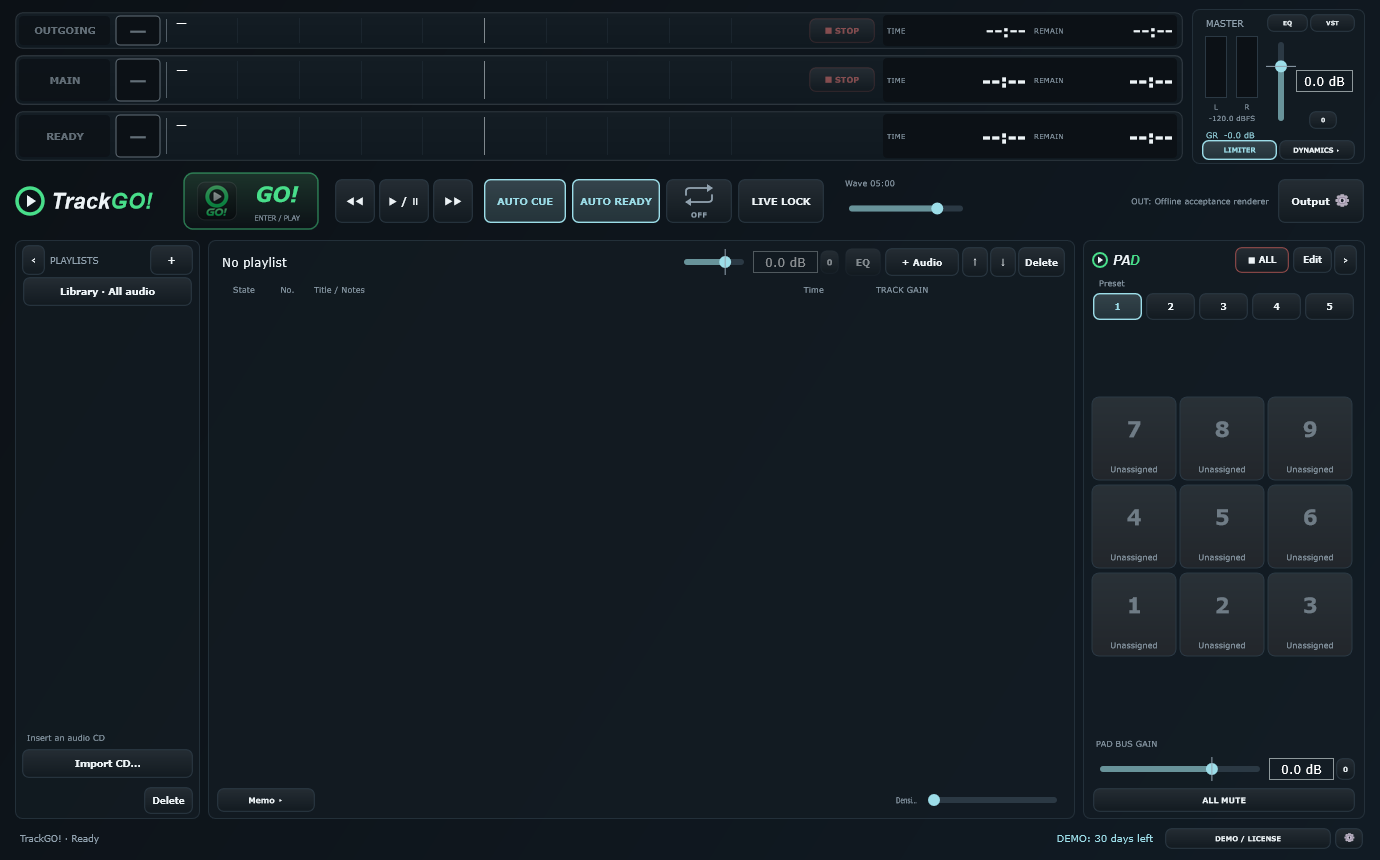
Organize your tracks in playlists. The READY, MAIN and OUTGOING lanes keep the preparation and playback states visible.
Select a track → prepare it in READY → press GO!
 TrackGO!
Availability
AUDIO PLAYBACK FOR WINDOWS
Backing tracks for a live set. Music for the stage. Sound effects on cue.
Keep your playlist and sound effects in one workspace. Prepare your next track, check that it’s ready, and press GO! when it’s time.
Starts in English · Japanese also available · No account needed to try
30 daysto try your own setup
READY → GO!prepare, then play
Playlist + PADmusic and sound effects
FROM REHEARSAL TO YOUR NEXT CUE
A playlist for the running order, a PAD area for individual sounds, and audio controls for the material you actually use.
Organize your tracks in playlists. The READY, MAIN and OUTGOING lanes keep the preparation and playback states visible.
Select a track → prepare it in READY → press GO!
Use the separate PAD area for effects and short cues alongside your playlist. Keep the sounds you need together in presets.
Music in the playlist. Individual cues on the PAD.
Adjust gain and 8-band EQ for each playlist track. Two stereo VST3 slots on the master output support your own compatible plug-ins.
Audio files, VST plug-ins and ASIO drivers are not included.
TRY IT WITH YOUR OWN SHOW
The trial runs for 30 days from your first launch. No registration is required, and you can start offline.
Before buying, try your usual tracks, output device and plug-ins. Make sure TrackGO! works for the way you use it.
Read the setup and recovery guideDownload the 30-day trial for Windows
Ver.1.0.0 · English default · ZIP package · No card needed. Windows may show a security warning because this release is not code-signed. Verify the download source and try it on your PC before buying.
Keep TrackGO.exe and its accompanying folders together. Run the app from the extracted folder, not from inside the ZIP.
Select and apply your output device. Create a playlist and add the tracks you normally use. Start at a low volume.
Use READY → GO!, stop and resume, try your PAD cues, then close and reopen the app to check your saved setup.
BEFORE YOU START
More setup, activation and backup guidance is in the English guide.
Yes. The trial can start offline. After purchase, each PC needs an internet connection for its first license activation. Once activated, that PC can be used offline without a periodic online check requirement.
The license is for one person and permits that person to use multiple PCs, including at the same time. Activate each PC separately. A license cannot be shared with other people.
The trial lasts 720 hours from first launch. Reaching the end during an open session does not interrupt that session’s playback; playback restrictions apply at the next launch. You can still view and back up saved data and activate a purchased license.
Normal changes are saved automatically; there is no separate Save button. Check that your playlists and settings remain after closing and reopening the app. MASTER GAIN and PAD BUS GAIN return to 0 dB on restart. If a save error appears, follow the message rather than assuming the change was saved.
No. Use your own audio, compatible VST3 plug-ins and the appropriate driver for your audio device. Test those together during the trial before purchasing.
TrackGO! is available to customers in Hong Kong SAR, Singapore and Australia, at JPY 4,980 for a one-person, one-time purchase. Credit card payments are processed by KOMOJU in Japanese yen. English and Japanese inquiries use the same support team, with an initial reply target of three business days in Japan. See the support conditions.
INTERNATIONAL AVAILABILITY
Available in Hong Kong SAR, Singapore and Australia. One-person license: JPY 4,980, paid once in Japanese yen. No subscription. Your card issuer may apply its own exchange rate and fees. Customers in Japan can use the Japanese store. Other international regions are not currently offered.